
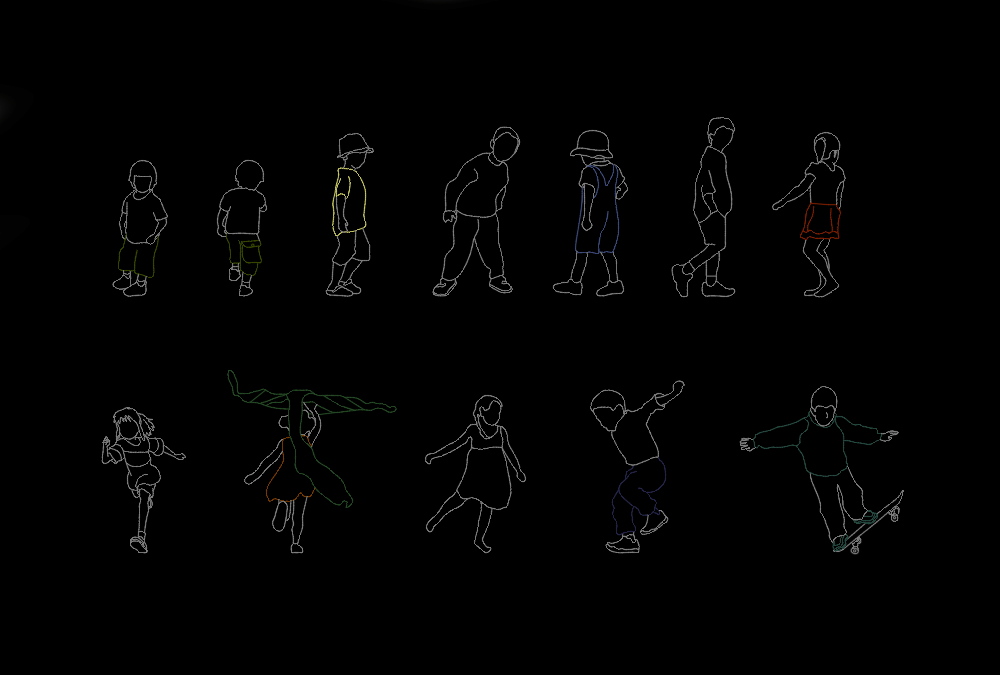
This Kids Playing CAD Blocks DWG is a useful collection of 2D children figures for AutoCAD and architectural drawings. The file includes multiple children in different playful poses and is especially suitable for adding activity, scale, and realism to architectural plans, elevations, landscape projects, playground designs, schools, parks, and residential environments.
Children figures are valuable architectural entourage elements because they help designers show how a space is expected to be used. Whether you are designing a playground, kindergarten, school, park, residential garden, public space, or recreational area, adding children to the drawing can make the final presentation more realistic and easier to understand.
The figures in this collection are provided in elevation view, making them particularly useful for architectural elevations, sections, façade drawings, landscape presentations, and other vertical representations.
Features of These Kids Playing CAD Blocks
- Multiple children playing figures
- Different poses and activities
- 2D CAD line drawings
- Elevation view
- DWG format compatible with AutoCAD
- Suitable for architectural and landscape projects
- Useful for schools, playgrounds, parks, and residential designs
- Easy to insert, edit, scale, and rotate
- Saves drawing and modeling time
- Free DWG CAD block download
Where Can You Use Kids Playing CAD Blocks?
These Kids Playing AutoCAD Blocks can be used in many types of architectural and design projects. They are particularly useful when a project includes spaces intended for children or families.
You can use these CAD figures in:
- Playground designs
- Kindergarten projects
- School architecture
- Children’s activity areas
- Residential projects
- Parks and gardens
- Public spaces
- Landscape architecture
- Recreational facilities
- Community projects
- Building elevations
- Architectural presentation boards
Why Use Children CAD Blocks?
Adding children to an architectural drawing can communicate the intended scale and function of a space. For example, children playing in a playground can immediately show the purpose of the area, while figures in a residential garden or public park can create a more natural representation of the environment.
Using ready-made Kids CAD Blocks also saves time. Instead of drawing every person manually, you can insert the appropriate figure into your AutoCAD project and adjust it to match your drawing scale.
Kids Playing in Elevation View
This CAD collection is particularly useful for elevation drawings. The different child figures can be placed in front of buildings, playground equipment, landscape elements, walls, fences, or other architectural features.
The figures can also be combined with other people CAD blocks to create more complete architectural scenes and presentation drawings.
Easy to Use in AutoCAD
The DWG format makes these children figures easy to use in AutoCAD. Simply insert or copy the required figure into your project, then adjust its position, scale, rotation, or orientation.
The CAD linework can be customized according to your preferred drawing style and presentation requirements.
Download Free Kids Playing DWG
Download this Kids Playing CAD Blocks DWG for free and add realistic children figures to your architectural and landscape projects. This collection is a practical resource for architects, interior designers, landscape designers, urban planners, students, and CAD professionals.
File Information
File Format: DWG
Software: AutoCAD
Category: People / Kids / Children CAD Blocks
Drawing Type: 2D CAD Block
Subject: Kids Playing
View: Elevation
File Size: 203 KB
Use: Architecture, Landscape, Schools, Parks, Playgrounds
Download: Free


