
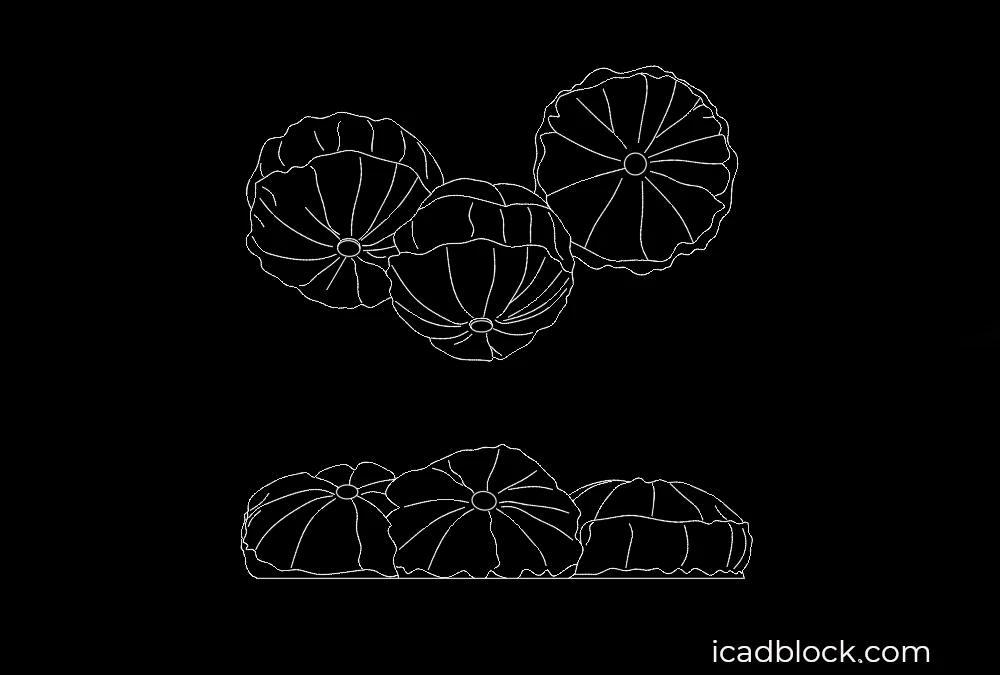
Download this Round Pillow CAD Block in DWG format for AutoCAD. This 2D pillow drawing is a useful addition to architectural plans, interior design projects, furniture layouts, bedrooms, living rooms, hotels, and residential interiors.
A Round Pillow DWG can be used to add realistic soft furnishings to floor plans and interior design drawings. The block is easy to insert, resize, move, and customize according to your project requirements.
Round Pillow CAD Block for AutoCAD
This round cushion CAD block is designed for architects, interior designers, decorators, students, and CAD professionals who need a simple furniture accessory for their drawings.
Pillows and cushions can help make interior plans more detailed and realistic, especially when designing bedrooms, sofas, lounge areas, seating spaces, and hospitality interiors.
Features of the Round Pillow DWG
- 2D round pillow CAD block
- DWG format for AutoCAD
- Suitable for architectural drawings
- Ideal for interior design projects
- Useful for bedrooms and living rooms
- Suitable for sofa and seating layouts
- Easy to insert and scale
- Can be edited and customized in AutoCAD
- Compatible with AutoCAD and other DWG-supported CAD software
Where to Use This Round Pillow CAD Block
The Round Pillow DWG can be used in residential floor plans, bedroom layouts, living room designs, hotel interiors, lounges, waiting areas, and other spaces that require detailed furniture and accessories.
It can be placed on beds, sofas, armchairs, benches, or other seating areas to improve the visual quality of an interior drawing.
Download Round Pillow DWG
Add this Round Pillow AutoCAD Block to your CAD library and use it in your next architectural or interior design project. The DWG format makes the drawing practical for professional and student projects.
Format: DWG
File Size: 163 kb
Category: Furniture CAD Blocks
Object: Round Pillow / Round Cushion
Use: Architecture, Interior Design and Furniture Layouts
Software: AutoCAD and compatible CAD programs
Free Download

